Professional Rendering vs AI Rendering Tools: Which Should You Use?
AI tools can turn a sketch into an image in seconds for a monthly fee. But marketing and approval renders must match your plans exactly, and that is where a professional studio like UVL Global still wins.
See your price before contact
Delivery from 48 hours
Up to 3 revision rounds
Dedicated project manager
Updated 25 October 2026By the UVL Global team5 min read
Free, no obligation
Get a professional render quote
Tell us what you need. We reply with a fixed price and delivery date.
1,050+Projects delivered
20+ yrsVisualization experience
From $150Per view, online estimate
48 hrsFastest delivery
Quick verdict
Which option should you choose?
Many teams use both: AI for early ideas, a studio for the renders buyers and planners see.
RECOMMENDED FOR MARKETING AND APPROVALS
Choose UVL Global if you...
Need renders that match your plans exactly
Need consistent views across a whole project
Need high-resolution files for print and signage
Want an expert team to handle lighting and materials
Want 3 revision rounds instead of endless re-prompting
AI tool details from Capterra and Krea, checked 25 October 2026.
At a glance
Professional rendering vs AI tools, side by side
UVL Global
AI rendering tools
Cost
From $150 per view (online estimate)
Free tiers to about $99 a month per user
Speed
48 hours
Seconds to minutes per image
Accuracy to plans
Modeled from your CAD or BIM files
Reviewers report distorted or added objects
Consistency across views
One scene, consistent lighting and materials
Can vary between generations
Resolution
High-resolution files for print
Many tools stop at screen size without upscaling
Who does the work
Expert team and project manager
You write and refine the prompts
Revisions
Up to 3 targeted rounds
Repeated prompts, results can drift
Best for
Marketing, sales and approvals
Early concepts and mood boards
AI tool facts from Capterra (MyArchitectAI pricing and reviews) and Krea (AI rendering tools overview), checked 25 October 2026. Green marks the stronger option on each row.
In detail
How they compare, point by point
Cost
AI tools
AI tools range from free tiers to paid plans. Capterra lists MyArchitectAI at $29, $49 and $99 a month per user.
UVL Global estimates from $150 per view. For a launch, that cost is small next to the value of accurate marketing images. Use the cost calculator.
Accuracy
UVL Global
UVL Global builds each scene from your plans, so dimensions, materials and details match the design.
AI tool reviewers report distorted objects, unrequested elements and changes to areas meant to stay the same.
Consistency
UVL Global
UVL Global renders every view from one 3D scene, so lighting and finishes match across the set.
AI tools generate each image separately, and reviewers note consistency can vary between revisions.
Speed
AI tools
AI tools produce images in seconds, which is great for quick ideas.
UVL Global delivers in 48 hours, with rush delivery for tight launches.
Send your files today, see the first renders in as little as 48 hours.
Share your files
Send plans, CAD, Revit or SketchUp models and reference images.
Day 0
Get a fixed quote
We confirm views, style and a delivery date before work starts.
Before work starts
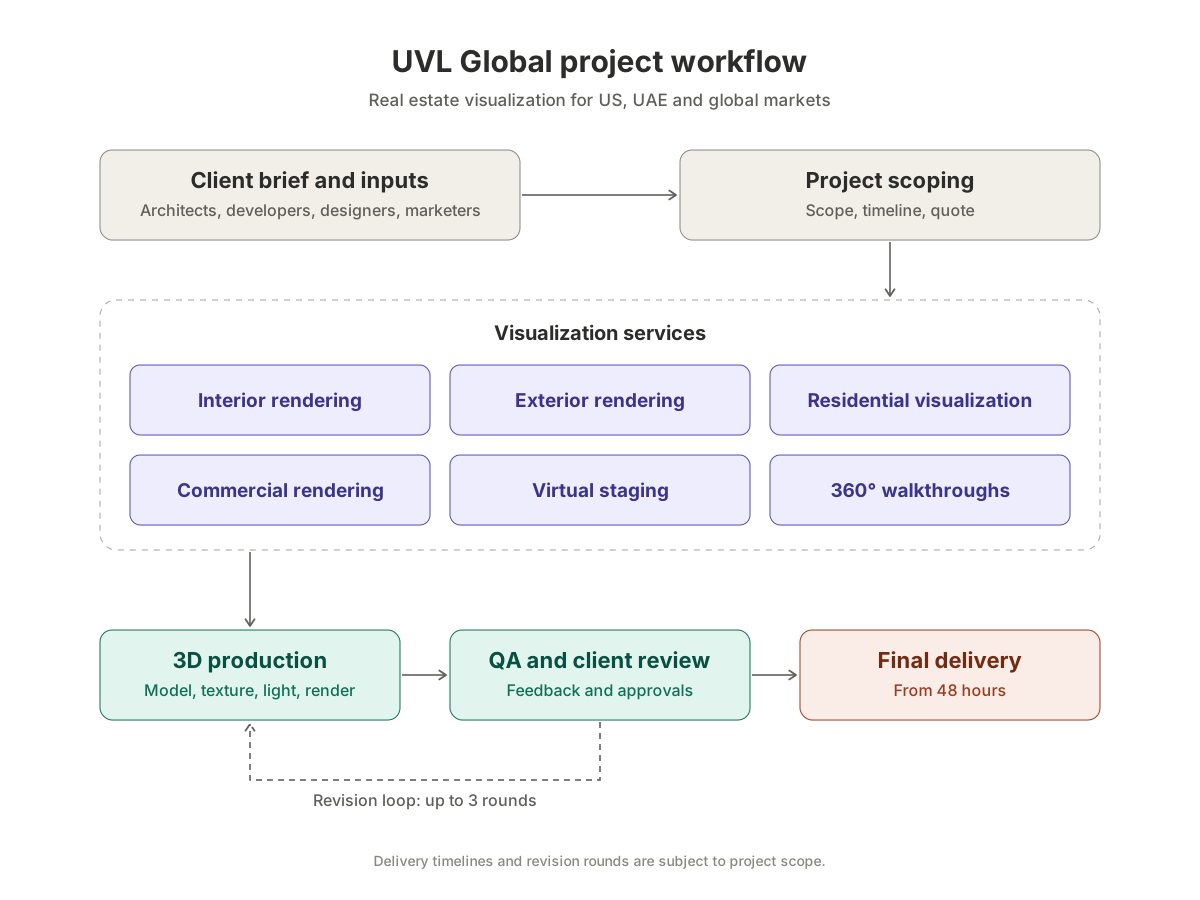
3D production
Our team models, textures, lights and renders each view.
Review and refine
Give feedback on the drafts. Up to 3 revision rounds included.
Final delivery
High-resolution files ready for marketing, sales and approvals.
From 48 hours
2-minute request
Need renders buyers can trust? Get our price.
Share three details and we will send a fixed quote with a delivery date. Or try the instant cost calculator.
FAQ
Professional vs AI rendering: common questions
Can AI replace professional architectural rendering?
Not for marketing or approvals yet. AI tools are fast and cheap for concepts, but reviewers report distortion and inconsistency. Professional renders built from your plans stay accurate across every view.
How much do AI rendering tools cost?
Many have free tiers. Capterra lists MyArchitectAI at $29, $49 and $99 a month per user. UVL Global estimates professional renders from $150 per view.
Are AI renders accurate to my floor plans?
Often not exactly. Image-based AI tools work from pictures rather than your model, and reviewers report added or distorted objects. Professional renders are modeled from your CAD or BIM files.
When should I use AI rendering tools?
AI tools are useful for early concept and mood images, quick internal options and very small budgets where exact accuracy does not matter.
Can I combine AI tools with a professional studio?
Yes. Many teams explore ideas with AI, then send the chosen direction to a studio like UVL Global for accurate, high-resolution marketing renders. See our full list of rendering studio comparisons.
Why teams choose UVL Global
Price and delivery date before you commit
Delivery from 48 hours
Up to 3 revision rounds included
Moving beyond AI renders?
Tell us about your project
Share a few details. We reply with a fixed quote and a delivery date.